

Are you looking to join the hilarious internet trend of "Kirkifying" images? If you’ve seen those viral memes featuring shrunken faces or the iconic Charlie Kirk face swap and wondered, "How can I do that?" you’ve come to the right place.
In this guide, we will walk you through exactly how to use Kirkify.co, the premier AI tool designed specifically for creating high-quality Kirkify memes. Whether you want to shrink a face for comedic effect or swap faces with the meme legend himself, this step-by-step tutorial will help you master the art of the "Kirkify."
What Does It Mean to "Kirkify"?
To "Kirkify" an image usually refers to two distinct AI editing styles popularized by internet culture:
- Face Shrinking: Digitally reducing the size of facial features (eyes, nose, mouth) while keeping the head size normal, mimicking the viral memes of Charlie Kirk.
- Face Swapping: Seamlessly replacing a subject's face with Charlie Kirk’s face or another custom meme face.
Kirkify.co is a specialized AI platform that automates this process, removing the need for complex Photoshop skills.
Step-by-Step Guide: How to Use Kirkify.co
Follow these 8 simple steps to create your own masterpiece.
Step 1: Visit the Official Website
Open your browser and navigate to https://kirkify.co/. The homepage is clean and user-friendly, showcasing examples of "Kirkified" images so you know exactly what to expect.
Step 2: One-Click Login with Google
To start generating, you need an account. Look for the "Sign in with Google" button.
- Why this is great: You don't need to remember a new password. It’s a secure, one-click process that instantly creates your profile and grants you access to the dashboard.
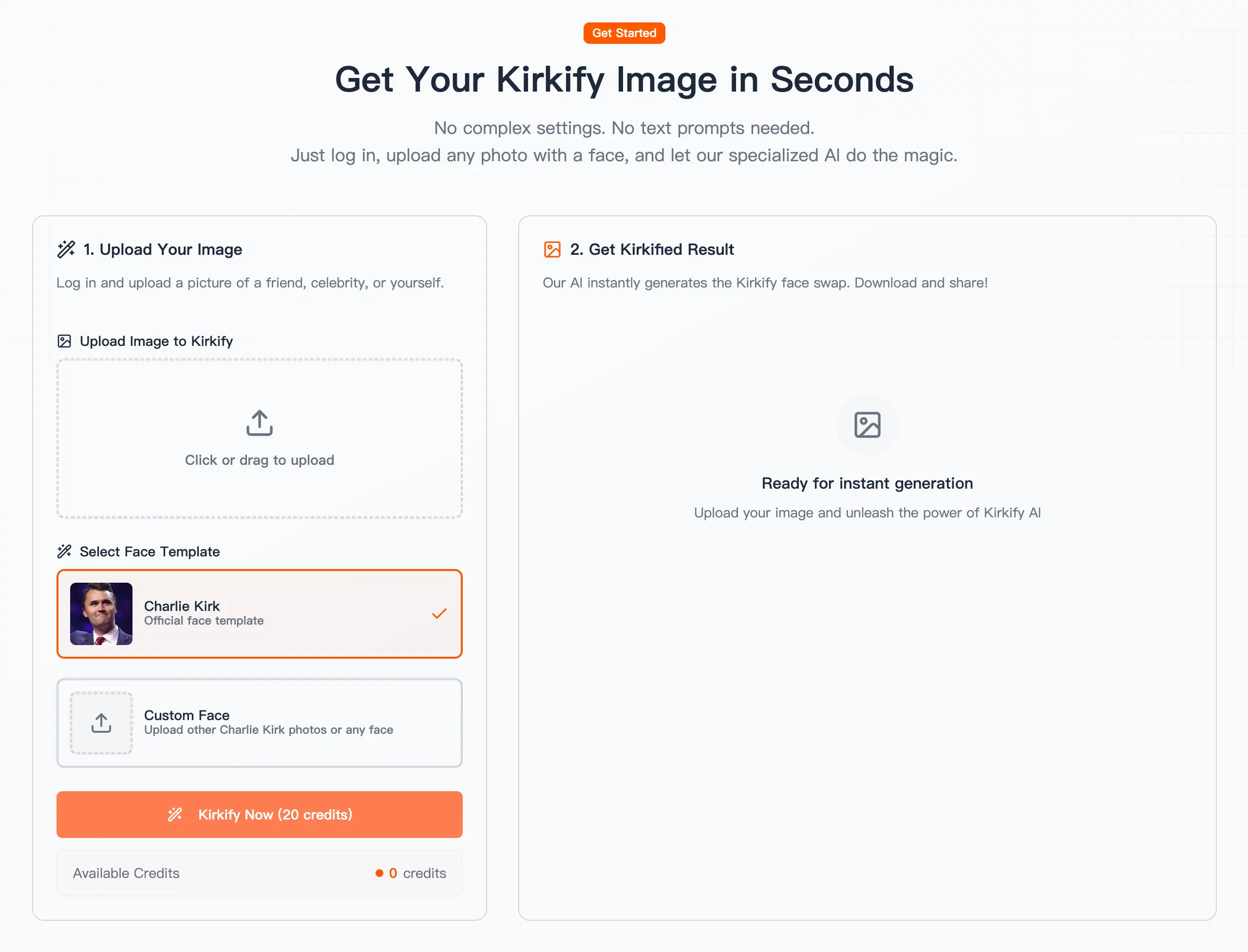
Step 3: Upload Your Target Photo
Click on the "Upload Image" area. Select the photo you want to edit.
- Pro Tip: For the best results, choose a high-resolution photo where the subject is facing the camera directly. Avoid photos that are blurry, too dark, or where the face is covered by sunglasses or masks.
Step 4: Upload a Charlie Kirk Face (Optional)
Kirkify.co offers flexibility. By default, the tool may use its "Official face template" (the classic Charlie Kirk look). However, you have the option to upload a Custom Face.
- If you have a specific funny Charlie Kirk expression or a different meme face you want to use, upload it here.
- Note: If you skip this, the AI will use the standard template, which is perfect for beginners.
Step 5: Click "Kirkify Now"
Once your images are uploaded, locate the "Kirkify Now" button (sometimes labeled with a credit cost, e.g., "20 credits").
- Clicking this signals the specialized AI model to analyze facial landmarks and apply the "shrink" or "swap" effect.
Step 6: Wait for AI Generation
Sit back and relax. The generation process is usually fast, taking only a few seconds.
- During this time, the AI is blending skin tones, adjusting lighting, and resizing features to ensure the edit looks "realistically fake"—the hallmark of a good meme.

Step 7: Compare the Results
Once the process is complete, the website will display your generated image.
- Take a moment to compare the Original vs. the Kirkified version. The humor often lies in the subtle (or drastic) difference between the normal face and the tiny/swapped face.
Step 8: Download Your Final Image
Happy with the result? Click the Download button to save the high-resolution image to your device. You are now ready to share your creation on X (Twitter), Reddit, or Instagram.
Tips for the Perfect "Kirkify" Result
- Lighting Matters: Evenly lit photos allow the AI to blend faces much better than photos with harsh shadows.
- Face Angle: Profiles (side views) are harder for AI to process. Stick to frontal views for that classic meme look.
- Resolution: Higher quality inputs yield higher quality outputs. Don't use pixelated thumbnails.
Conclusion
Using Kirkify.co is the easiest, fastest way to participate in the Charlie Kirk meme culture. With just a few clicks, you can transform ordinary portraits into internet gold. No Photoshop skills required—just your creativity and a sense of humor.